Terminal vs. Shell
Terminal
Terminal Device 是我們看到的視覺化介面,當我們打開 Terminal 軟體,這個東西就是 Terminal,他負責的是接收你的鍵盤輸入、把你的鍵盤輸入顯示在螢幕上並且在你按下 enter 後把輸入交給 shell
Shell
在 Shell 接收到 Terminal 傳來的輸入後,他會對其進行解析,像是對於 ls -l 這行指令 Shell 就會知道要執行 ls 這行指令並且帶上 -l 參數,執行完成後再將輸出傳回給 Terminal 並且顯示在螢幕上
Terminal Device
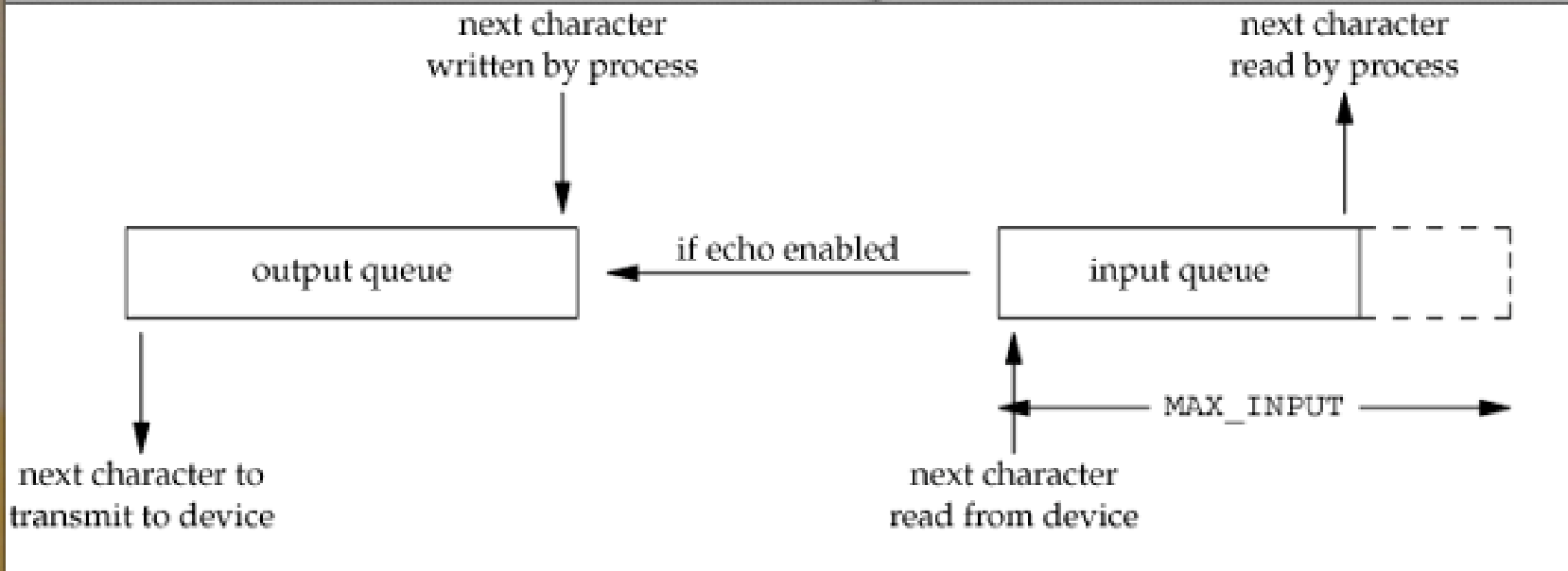
OS treat terminal as an device. Hence, it has an input queue and output queue to manage data input and output, just like that for disk (event queue)
Input Queue
When we type in characters, the characters won’t be processed immediately. Instead, they will be pushed into the input queue. Then, once the shell or processes are ready to read, it will pop characters from the queue and process them
Output Queue
When the process wants to show something on the screen, such as ls. These output characters will first be push into the output queue. The terminal will retrieve these characters from the queue in sequence then output on the screen
Mode
Canonical Mode
The shell will only read the input once you press enter. This is why we can backspace and revise our typing if we have typo
Non-canonical mode
Non-canonical mode, on the other hand, will read your typing once you’ve typed. This is how vim works in terminal. Your input will be read immediately once you type it
Blocking/Nonblocking
When the output queue start to fill up, i.e., the process output much faster than the speed the terminal retrieve them from queue
Blocking
In blocking mode, the terminal will let the process sleep until the output queue have space for the process to output
Nonblocking
The process will be busy waiting asking if there’s space to output. This won’t have much difference in single user system, but will waste CPU time in multiuser system
We call the process of repeatedly asking “polling”